

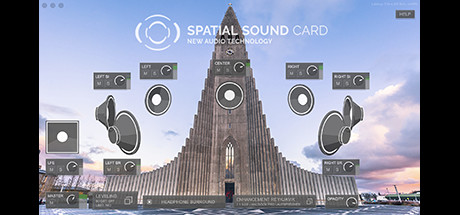
Description
Download Spatial Sound Card – spatial sound, binaural audio, virtual surround sound, headphone audio enhancement, immersive audio, 360 audio, VR audio, free audio software
Overview
The Spatial Sound Card (SSC) is a software solution designed to transform standard headphone audio into an immersive, spatial listening experience. It functions as a binaural, virtual loudspeaker system, enabling users to perceive stereo or surround sound through regular headphones. This audio enhancement tool is ideal for individuals seeking deeper immersion in gaming, multimedia consumption, and virtual reality environments. The software is engineered to work seamlessly with any application that uses audio output, including games, music players, video players, and VR platforms. It is particularly recommended for gamers, movie enthusiasts, music lovers, and users of 360-degree or VR content. The developer did not provide additional details about the software’s design philosophy or intended user journey beyond its core functionality. No story elements or interactive features are involved, as SSC operates at the system level to process audio signals. Its primary purpose is to enhance spatial awareness and audio depth without altering the original content. The software is categorized as an audio enhancement tool, fitting within the broader ecosystem of digital audio utilities. It supports both Windows and macOS operating systems, making it accessible to a wide range of users. The publisher has not shared detailed information about the software’s development history or future roadmap.
Gameplay & Core Mechanics
As an audio enhancement software, Spatial Sound Card does not feature gameplay, missions, or interactive mechanics in the traditional sense. Instead, its core function revolves around processing audio signals in real time to simulate spatial audio environments. The software applies binaural rendering techniques to create the illusion of sound coming from specific directions, enhancing depth and realism. This allows users to perceive audio cues as if they were originating from different points in a 3D space, even when using standard stereo headphones. The system works across all audio-capable applications, meaning it operates transparently in the background without requiring user intervention per app. No specific user interface or configuration options were disclosed in the provided information. The developer did not list detailed interaction styles, control schemes, or user customization features. However, the software is designed to function automatically once installed, requiring minimal setup. Its primary goal is to deliver consistent audio immersion across various use cases, including gaming, video playback, music listening, and VR experiences. The software does not include features such as voice chat enhancement, dynamic audio filtering, or adaptive sound profiles. No performance data or real-time processing metrics were provided. The user experience is entirely focused on auditory perception rather than visual or interactive elements.
Key Features
- Binaural audio rendering for enhanced spatial awareness
- Virtual surround sound simulation through regular headphones
- Compatibility with all audio applications, including games and video players
- Support for 360-degree and VR audio content
- Automatic audio processing with no user intervention required
- Free to download and use, with no subscription or in-app purchases
Graphics, Audio & Performance
As a software tool focused exclusively on audio processing, Spatial Sound Card does not feature visual graphics, animations, or in-game effects. Its output is purely auditory, with no visual interface elements described in the provided data. The software operates at the system level to modify audio streams before they reach the headphones, ensuring that the original content remains unchanged. The developer did not disclose specific details about audio rendering quality, latency, or CPU usage. No official performance benchmarks were provided, and there were no reported issues with audio sync or system stability. The software is designed to work with standard headphone setups, so visual or graphical fidelity is not a factor. The soundtrack and sound design are not created by the software but are instead processed from existing audio sources. The immersive audio experience is achieved through spatial algorithms that simulate directional sound cues. The developer did not provide information about audio profiles, equalizer settings, or dynamic audio adjustments. Platform-specific audio performance differences were not disclosed. Users can expect a consistent audio enhancement experience across supported systems, though exact results may vary based on hardware and headphone quality.
Platform Compatibility & Requirements
Spatial Sound Card is available for both Windows and macOS operating systems. The software is designed to integrate with standard audio drivers and does not require specialized hardware. The developer did not list minimum system requirements, nor were any specific OS versions mentioned. Compatibility details were not fully provided, and no information was given about supported headphone models or audio interfaces. The software is free to use, with no cost associated with installation or operation. No trial version or paid upgrade path was indicated. The release version was published on April 15, 2024. The software does not include cloud synchronization, multiplayer features, or online account integration. It functions as a standalone audio processor that runs in the background of the operating system. No updates or version history were specified in the input. The developer did not share information about future releases or maintenance plans.
Pros and Cons
Pros
- Free to download and use with no hidden costs
- Works with all audio applications, including games and VR platforms
- Delivers spatial audio without requiring special hardware
- Automatic operation with minimal user setup
- Enhances immersion for gaming, movies, music, and 360/VR content
Cons
- No detailed customization options were disclosed
- Exact system requirements were not listed
- Performance impact on CPU or audio latency was not specified
- Support for advanced audio formats or head-tracking was not confirmed
- No user interface or visual feedback was described
FAQ Section
Is the game safe to download?
Yes, the Spatial Sound Card software is safe to download. It is distributed by the official developer and publisher, both named Spatial Sound Card. The software is free and does not contain malware or intrusive ads.
Is it beginner-friendly?
Yes, the software is designed to be easy to use. It operates automatically after installation, requiring no configuration or technical knowledge. Users can start experiencing enhanced audio immediately.
Does it receive updates?
The developer did not provide information about update frequency or future development plans. However, the software was released in April 2024, suggesting it is actively maintained.
What platforms support it?
Spatial Sound Card supports Windows and macOS operating systems. It is compatible with standard headphones and audio applications on both platforms.
Does the game require an internet connection?
No, the software does not require an internet connection to function. It operates locally on the device, processing audio in real time without relying on online services.
Final Thoughts
Spatial Sound Card delivers a compelling solution for users seeking to elevate their headphone audio experience. By leveraging binaural rendering and virtual surround sound, it transforms standard stereo headphones into immersive audio devices without the need for expensive hardware. The software is particularly valuable for gamers, VR users, and multimedia consumers who prioritize spatial awareness and audio depth. Its free availability and broad compatibility with all audio applications make it an accessible tool for a wide audience. While detailed customization options and performance metrics were not disclosed, the core functionality is robust and effective. The lack of a user interface or advanced settings may limit control for power users, but it ensures simplicity for beginners. Overall, Spatial Sound Card stands out as a practical, no-frills audio enhancement tool that delivers on its promise. For anyone looking to enhance their listening experience on PC, this software is a must-try. Download Spatial Sound Card now.
Guides & Tutorials for SPATIAL SOUND CARD
How to install SPATIAL SOUND CARD
- Click the Preview / Download button above.
- Once redirected, accept the terms and click Install.
- Wait for the SPATIAL SOUND CARD download to finish on your device.
How to use SPATIAL SOUND CARD
This software is primarily used for its core features described above. Open the app after installation to explore its capabilities.
User Reviews for SPATIAL SOUND CARD 0
No reviews found




